
Launching a website on a custom domain does not require an expensive server or a complicated technical setup. With modern static hosting, lightweight HTML, optimized images and reliable DNS services, it is possible to build a professional website that loads quickly and remains easy to maintain.
Whether you are creating a technology blog, portfolio, business website, personal project or online store, the basic process is similar. You need a suitable domain, reliable hosting, correctly configured DNS, optimized website files and a performance-focused design.
What Is a Custom Domain?
A custom domain is the unique web address visitors use to access your website. For example, BITOMANCY uses the domain bitomancy.in.
The domain and website hosting are two separate parts of the system. The domain is the address people type into their browser, while hosting is the service that stores and delivers your website files.
You can purchase a domain from one company and host your website with another. DNS connects the domain with the hosting service.
Why Website Speed Matters
Website speed affects how quickly visitors can see and interact with your content. A page that takes too long to become usable can create a poor browsing experience, particularly for visitors using mobile devices or slower connections.
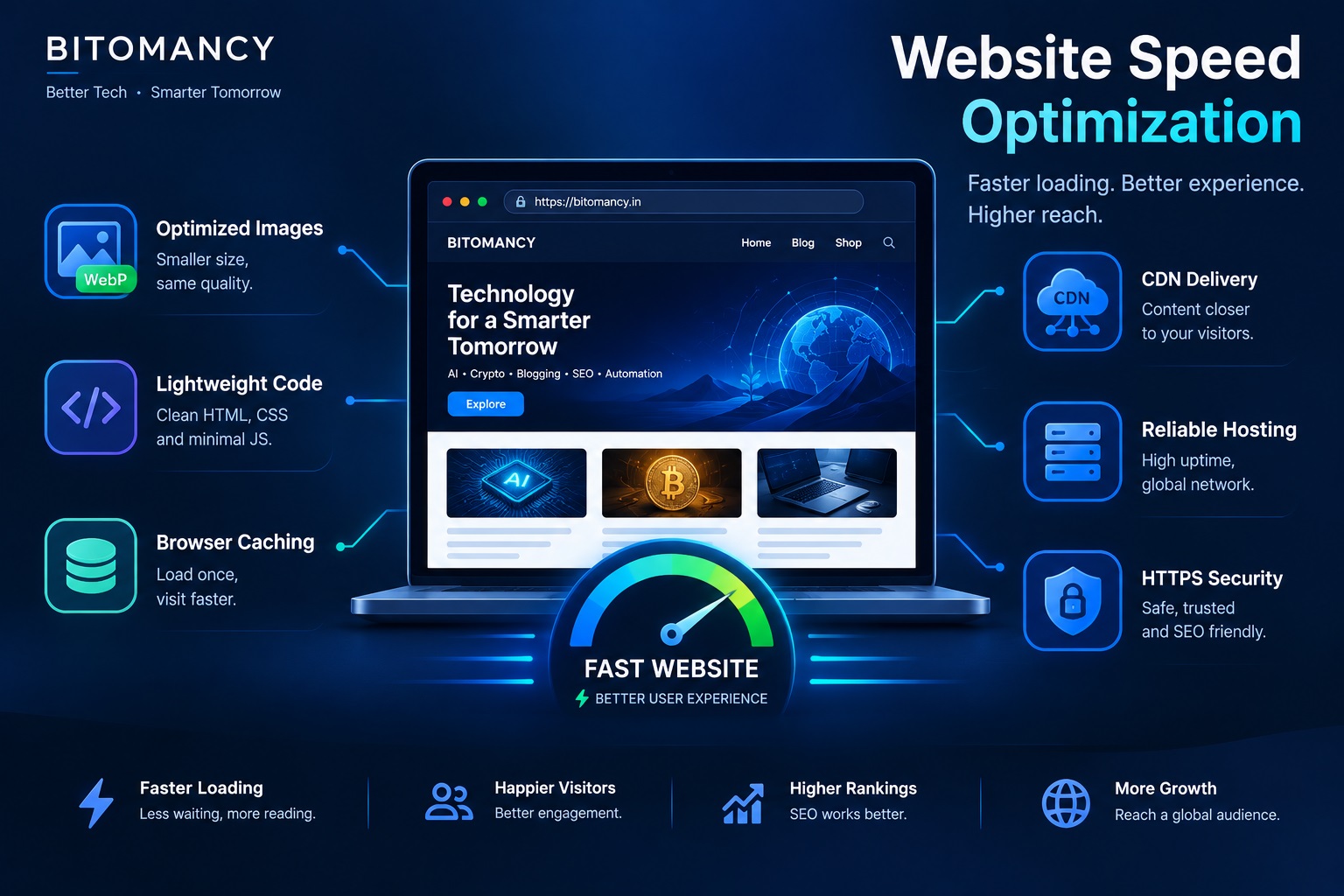
A fast website generally relies on several small optimizations rather than one single setting. Lightweight HTML, efficient CSS, optimized images, sensible JavaScript usage, caching and a content delivery network can all contribute to better performance.
Step 1: Choose a Good Domain Name
Start by choosing a domain that is short, memorable and relevant to your website. A simple domain is generally easier for visitors to type, remember and share.
Avoid unnecessary numbers, confusing spellings and long combinations of words. Before registering a domain, check that it does not create confusion with an existing website or brand.
Step 2: Choose Fast Website Hosting
After registering your domain, you need a hosting platform to deliver your website files. For lightweight websites, static hosting can be an efficient option because the server does not need to generate every page dynamically.
Services such as Cloudflare Pages, GitHub Pages, Netlify and Vercel can host static HTML, CSS, JavaScript and image files. The right choice depends on your project requirements and deployment workflow.
For a website such as BITOMANCY, a simple structure can contain HTML pages, CSS, JavaScript, images and article files. Keeping these components organized makes the site easier to maintain as it grows.
Step 3: Build a Lightweight Website
The code behind your website directly influences how much work a browser needs to perform. A clean website does not need to load multiple frameworks, libraries and effects just to display an article.
A lightweight project can use plain HTML and CSS with JavaScript only where interactive functionality is actually required.
website/
│
├── index.html
├── styles.css
├── script.js
├── posts.json
│
├── images/
│   ├── logo.png
│   ├── hero.jpg
│   └── article.jpg
│
└── posts/
    ├── article-one.html
    └── article-two.html
Step 4: Optimize Your Images
Images are frequently responsible for a large portion of a webpage's total size. Uploading a very large image when a smaller version would provide the same visual quality can unnecessarily increase loading time.
Before uploading an image, resize it to the dimensions you actually need and compress it. Modern formats such as WebP can also reduce file size when they are appropriate for your workflow.
Images that are outside the initial viewport can usually use lazy loading. The main image that visitors see immediately can be loaded eagerly when appropriate.
<img
  src="/images/website-speed-optimization.jpg"
  alt="Website speed optimization"
  loading="lazy">
Step 5: Keep CSS Lightweight
CSS controls the appearance and layout of a website. Large stylesheets containing unused rules can increase the amount of data a browser has to process.
For a content-focused website, organized CSS is often enough to create a professional design without adding unnecessary frameworks.
Step 6: Avoid Unnecessary JavaScript
JavaScript is useful for features such as navigation, search, theme switching and dynamic content. However, every additional script can add processing and network overhead.
Review third-party scripts carefully. Analytics, advertising, social widgets and external services can all introduce additional requests. Keep only the services that provide a clear benefit to your website.
Step 7: Connect Your Custom Domain
Once your website has been deployed, connect your custom domain through your hosting provider. The provider will normally tell you which DNS records need to be added or changed.
Depending on the service, you may be asked to configure records such as A, AAAA, CNAME or TXT records.
Do not change DNS records randomly. Use the exact values provided by your hosting platform and verify the configuration after saving the changes.
Step 8: Enable HTTPS
Your website should use HTTPS so that visitors communicate with the website over an encrypted connection. A properly configured HTTPS website should use an address beginning with:
https://bitomancy.in/Many modern hosting providers can issue and manage SSL/TLS certificates automatically. After enabling HTTPS, check that your preferred domain version works correctly and that alternative versions redirect to it when necessary.
Step 9: Use a CDN
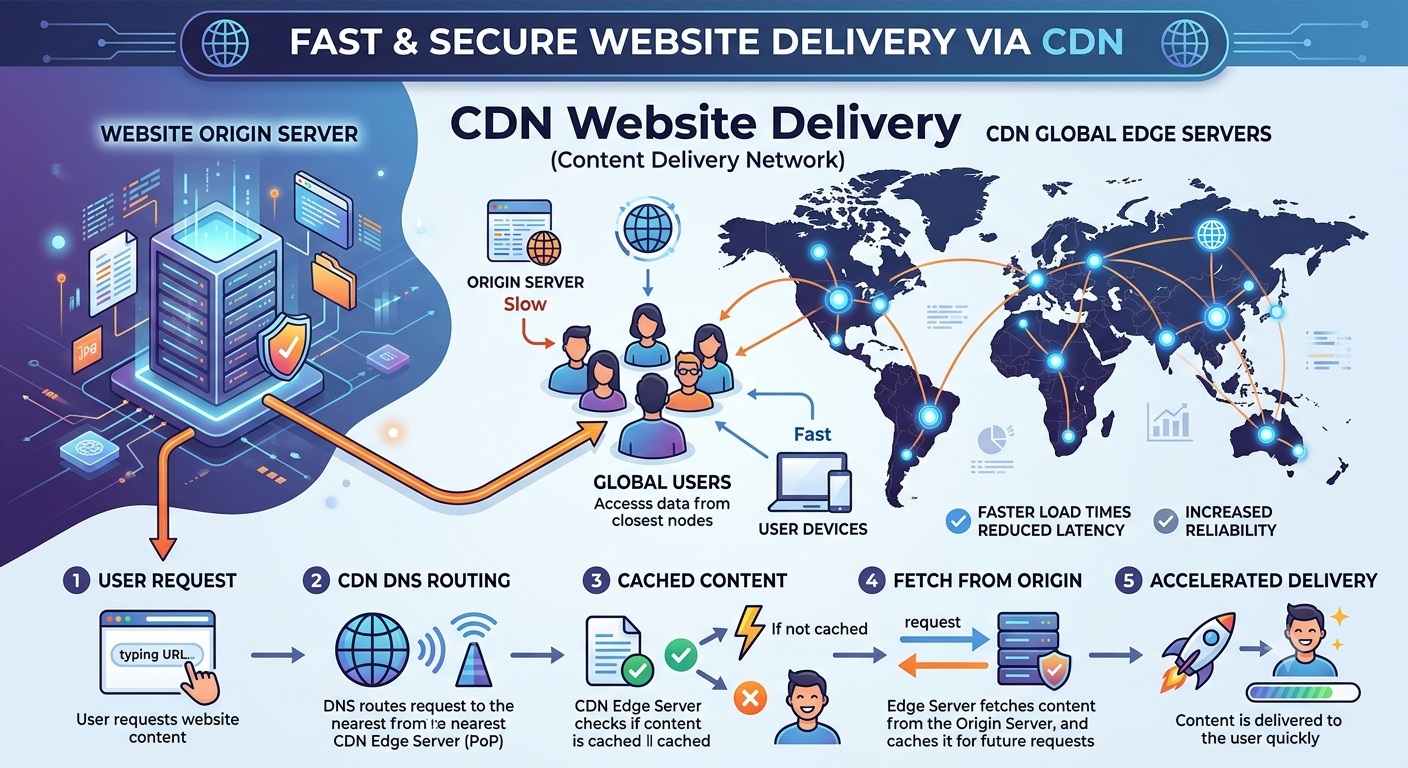
A Content Delivery Network, commonly called a CDN, helps deliver website resources through a distributed network. This can reduce the distance between visitors and the infrastructure serving static content.
CDNs can be useful for HTML, CSS, JavaScript, images and other static resources. Many modern hosting platforms include CDN delivery as part of their infrastructure.
Step 10: Configure Browser Caching
Caching allows browsers and intermediary systems to reuse resources that have already been downloaded. For example, a stylesheet that has not changed may not need to be downloaded again for every page visit.
Effective caching can reduce repeated network requests and improve the experience for returning visitors. Many static hosting platforms and CDNs provide caching automatically.
Step 11: Create SEO-Friendly URLs
Website URLs should be understandable to both visitors and search engines. A descriptive URL communicates the subject of a page before the visitor opens it.
For example:
https://bitomancy.in/posts/how-to-launch-fast-website-custom-domain.htmlKeep URLs readable, lowercase and relatively short. Avoid changing established URLs unnecessarily because changes can affect existing links and search indexing.
Step 12: Add Important SEO Metadata
Every important page should have a unique title and meta description that accurately describe its content.
<title>How to Launch a Fast Website on a Custom Domain | BITOMANCY</title>

<meta
  name="description"
  content="Learn how to launch a fast website on a custom domain using lightweight code, optimized images, HTTPS, CDN and modern hosting.">
A canonical URL can also identify the preferred version of the page when similar URLs exist.
Step 13: Create a Sitemap
A sitemap helps search engines discover important pages on your website. It should be updated as new articles and pages are published.
For a growing website, automating sitemap generation can reduce maintenance and help ensure that newly published content is included without manually editing the sitemap every time.
Step 14: Test Website Performance
Do not judge website performance only from your own computer. Test the website using performance tools and check both desktop and mobile experiences.
Important areas to monitor include Largest Contentful Paint, Cumulative Layout Shift, Interaction to Next Paint, total page size, image size, JavaScript usage and the number of network requests.
Step 15: Make the Website Mobile Friendly
A website that works well on a large desktop screen can still provide a poor experience on a smartphone. Responsive design allows the layout to adapt to different screen sizes.
Your mobile visitors should not need to zoom or scroll horizontally to read an article or interact with navigation.
@media (max-width: 768px) {

  .container {
    width: 94%;
  }

  .three-grid {
    grid-template-columns: 1fr;
  }

}
Step 16: Add Analytics and Search Monitoring
After launching your website, monitor how visitors discover and use it. Analytics can show which pages receive traffic, which devices visitors use and how people navigate through your content.
Search monitoring tools can also help identify indexed pages, search impressions, clicks, sitemap problems and other indexing issues.
Smart Copy PRO
Turn copied text into summaries, professional emails and LinkedIn-ready content in seconds.
Get Smart Copy PRO →A Simple Fast Website Architecture
A lightweight technology website can use a straightforward architecture where the custom domain points to the hosting platform, while the hosting platform delivers the site's HTML, CSS, JavaScript and image resources.
                 CUSTOM DOMAIN
                       │
                       ▼
                      DNS
                       │
                       ▼
                 CDN / HOSTING
                       │
                       ▼
                  BITOMANCY
                       │
          ┌────────────┼────────────┐
          ▼            ▼            ▼
        HTML          CSS          JS
          │            │            │
          └────────────┼────────────┘
                       ▼
                     IMAGES
                       │
                       ▼
                  FAST WEBSITE
Common Mistakes That Make Websites Slow
Several simple mistakes can increase page weight and make a website slower than necessary.
- Uploading huge images: Large images can consume bandwidth unnecessarily.
- Loading too many external fonts: External fonts can introduce additional network requests.
- Using unnecessary libraries: Extra frameworks and scripts increase the amount of code the browser must process.
- Adding excessive animations: Complex visual effects can increase browser workload.
- Loading everything immediately: Resources that are not required for the initial viewport can often be deferred.
- Ignoring mobile performance: A page that feels fast on a desktop connection may behave differently on mobile networks.
Fast Website Checklist
- Custom domain connected
- HTTPS enabled
- Mobile responsive design
- Images compressed
- Modern image formats used where appropriate
- Lazy loading enabled for non-critical images
- Minimal JavaScript
- Lightweight CSS
- CDN enabled where appropriate
- Browser caching configured
- SEO title added
- Meta description added
- Canonical URL added
- Sitemap created
- Robots.txt configured
- Search monitoring configured
- Analytics installed
- 404 page created
- Internal links checked
- Broken links tested
- Mobile performance tested
- Desktop performance tested
Key Takeaways
- A custom domain gives your website a dedicated and memorable web address.
- Static hosting can provide a simple and efficient foundation for many content websites.
- Optimized images and lightweight code can reduce page weight.
- HTTPS, caching and CDN delivery are important parts of a modern website setup.
- Mobile performance should be tested alongside desktop performance.
- SEO metadata, canonical URLs and sitemaps help search engines understand your website.
Frequently Asked Questions
Can I launch a website without expensive hosting?
Yes. Static websites can be hosted on several free or low-cost platforms, depending on the project's requirements. A simple website does not necessarily require an expensive traditional server.
Do I need a custom domain?
A custom domain is not technically required, but it provides a dedicated web address that can make a website easier to remember and share.
Does HTTPS make a website faster?
HTTPS is primarily a security feature rather than a speed optimization. Modern hosting infrastructure can combine HTTPS with technologies such as HTTP/2, HTTP/3, caching and CDN delivery to efficiently serve website resources.
Are large images bad for website speed?
Large images can increase the amount of data a browser needs to download. Resizing and compressing images before uploading them can significantly reduce unnecessary page weight.
Can a static website rank in search engines?
Yes. Static websites can be indexed by search engines when their pages are accessible, useful, crawlable and properly optimized.
How often should I test website speed?
Test your website after major design, code or content changes. Regular checks can also help identify performance problems caused by additional scripts, advertisements or increasingly large media files.
Conclusion
Launching a fast website on a custom domain is much more accessible than it once was. You can combine a suitable domain, static hosting, optimized images, lightweight code, HTTPS, caching and CDN delivery to create a website that is both professional and efficient.
The key is not to depend on one performance trick. Website speed comes from many small decisions working together. Remove resources you do not need, optimize the resources you do use and test the finished website on both desktop and mobile devices.
For a technology website such as BITOMANCY, this approach also makes the site easier to maintain as more articles, tools and resources are added.
Explore More on BITOMANCY
Want more practical technology and website guides? Visit the BITOMANCY homepage for more articles covering artificial intelligence, automation, SEO, blogging, website development and emerging technology.